Random Candy Colors
If you saw my recent “Candy Cosmos” post, you may have noticed that the randomly generated colors tend to be rather “vibrant”.
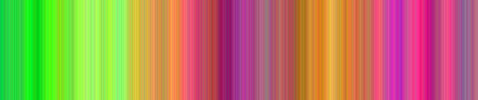
Pure red, green, blue, cyan, magenta and yellow colors appear frequently, while pure black and white colors occur occasionally, and colors near 50% gray tend to be the least common. The bright candy colors are a side effect caused by “limiting” the random values generated for each color channel.
Let’s say we start off with a neutral gray color with (R, G, B) values of (100, 100, 100). To get our next color we generate a random number between 5 and 10 then we either add it to, or subtract it from, the red channel. That means that there is a 50% chance our new red channel value will be between 90 and 95 and a 50% chance that it will be between 105 and 110. We repeat this process for each of the three color channels then combine them to make our new color. This produces a color similar to our original color, yet noticeably different.
The method above works well until the values of the color channels approach 0 or 255. Suppose the red channel has a value of 0. Using the above randomization technique would generate potential values between (-10 and -5) or between (5 and 10). Color channels can’t hold values below 0 or above 255 so corrective actions need to be taken. A simple solution is to “limit” the values. If the number is below 0 it is set to 0. If the number is above 255 it is set to 255. That means that once a color channel reaches a value of 0 or 255 there is a 50% chance that the value will remain unchanged. This is because there is a 50% chance that the next random number will either be added to, or subtracted from, the original channel value and thus produce a value outside the acceptable range which in turn results in no change to the original value.
Since the color channel values tend to hover near 0 (0x00) and 255 (0xFF), pure CMY colors (0xFFFF00, 0xFF00FF, 0x00FFFF) or pure RGB colors (0xFF0000, 0x00FF00, 0x0000FF) are common. Here is some code to illustrate:
//
// Create an object to contain our 3 color channels (r, g, b).
var myColorObj = {};
//
//
// Create the RGB channels and assign values to each of them.
myColorObj.r = 100;
myColorObj.g = 100;
myColorObj.b = 100;
//
//
// Each color channel will be randomized.
// The color channel will go up or down by at least the MIN value.
var minColorChannelVary = 5;
// The color channel will go up or down no more than the MAX value.
var maxColorChannelVary = 10;
//
//
// Goes through each color channel in a color object
// and adds or subtracts a random number
// between the min and max values
// to each color channel.
// Color channel values are limited between 0 and 255.
function randomizeColor(colorObj, min, max){
for(var i in colorObj){
var chnl = colorObj[i];
var ran = min + Math.random() * (max-min);
chnl += (Math.round(Math.random()) ? ran : -ran);
colorObj[i] = Math.max(0, Math.min(chnl, 255))
}
return colorObj;
}
//
//
// Converts 3 color channels in the color object to
// one hexadecimal value like 0xFFFFFF.
function rgbToHex (colorObj){
return(colorObj.r<<16 | colorObj.g<<8 | colorObj.b);
}
//
//
// Draws a 1 by 100 box using the specified color.
function drawBox(x, color){
//clear();
beginFill(color);
moveTo(x, 0);
lineTo(x+1, 0);
lineTo(x+1, 100);
lineTo(x, 100);
lineTo(x, 0);
}
//
//
// Draw a random color and then move over to the right 1 pixel
// and draw the next random color. Repeat 500 times until
// a brightly colored banded gradient covers the stage.
function genCandyGradient(){
clear();
for(var i=0; i<500; i++){
randomizeColor(myColorObj, minColorChannelVary, maxColorChannelVary);
drawBox(i, rgbToHex (myColorObj));
}
}
genCandyGradient();
//
//
// Draw a new gradient every time the mouse is pressed.
onMouseDown = genCandyGradient;
//
//
//
Here is the SWF produced by the above code, click it to see new random colors:
I doubt you'll need to create a brightly colored banded gradient every day but it may prove useful some time.
So now you know.
 Comments(4)
 RSS Feeds
@Robert, decrease 255 to a lower number.
hi. awesome code! i was wondering if there is any possible way for darker colours?
Kind of an optical illusion they give, don’t they? If I look for a few seconds on the colors I get the imagination that they are moving.
Love the colours. Made a much simpler version a while back for myself, as inspired by a recent trip to Mexico. If there’s anywhere in the world that is reflected in those colours, it’s there.
Love ya work, highly inspiring.