Adobe PDF and Flash CS3 “Integration”
Here are two direct quotes from Adobe’s web site…
- PDF: “Adobe Portable Document Format (PDF) lets you capture and view robust information—from any application, on any computer system—and share it with anyone around the world.”
- CS3: “Revolutionary integration – in editions for web, design, and video, and the all encompassing Master Collection – means you can flow across and within applications, in virtually any medium.”
So riddle me this my caped Flashers… Why can’t Flash CS3 import a PDF file? Flash 8 could import PDF files, why not Flash CS3?
Here’s what you see when you try to import a PDF file into Flash 8:
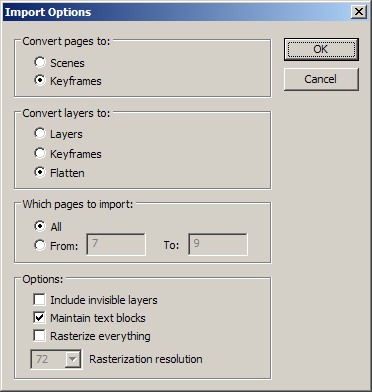
Here’s what you see when you try to import a PDF file into Flash CS3:
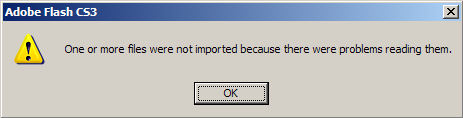
Why has a fairly significant feature been removed from an application touting its “REVOLUTIONARY INTEGRATION”? My guess is that it has less to do with “file integration” and more to do with “cash extraction”.
To get a PDF into Flash with CS3 you have to open the PDF file in Illustrator ($599, only $199 if you upgrade), save it as an AI file, and then import it into Flash. I’d like to think Adobe has a good reason for removing the PDF import feature from Flash, but to me this just seems like corporate dickery.
 Comments(26)
 RSS Feeds
PDF generation is possible with PHP, I believe. What you need to do is redirect the user to a PHP form (with all of the information passed in a GET request) and have PHP generate a PDF file which it outputs for the user to download.
I make a JPEG of the document and then import it in flash.
I just had a nightmare of a day dealing with this issue today. I did end up doing the Illustrator workaround but I had no idea that this did exist in a prior version! I was scratching my head over why they would not have included this in the first place. To find out that this was there and taken away p*sses me off!!!
@Michael, Thanks for the heads up.
@Oliver, I tried your suggestions but they didn’t seem to work, can you provide more specific directions?
When I try to import a PDF-file into Flash CS3, it actually works. It sees it as a video and opens the Video Import dialog box; works through Import to Library and Import Video. Could it be a settings issue? When importing, PDF-files don’t show as supported file formats, but when switching to the All Files-option and selecting the PDF, it works.
Oliver
@Oliver
Even i tried switching to all files
but it won’t even show pdf files in the folder
obviously there’s a filter in browse window
Is there any way to show pdf in flash?
hi there,
i now use PDF to SWF conversion for all my pdf’s. it works very well !
“pdf2swf” converter published by: http://www.swftools.org/
there are a lot of other tools in “swftools” that i am not familiar with, but the mentioned converter is great.
i use SWF files with external AS2 loader without provided viewer options, but it can be used with viewers or simply imported in Flash CS3 as frame by frame.
i wonder, if anyone tried it.
@Koert, Thanks for the great link. Looks like another case of corporate politics gone amok.
I think this explains the whole situation quite well…
http://www.stress-free.co.nz/the_demise_of_flashpaper_sends_a_warning_to_developers
Clearly just a matter of adobe pushing a product forward in favor of another (pdf in favor of flashpaper).
@Joshua from Yurp, you make a good point. If people aren’t happy with Adobe’s policies, they need to be sure to tell Adobe about it. Thanks for stopping by and say “Hi” to ALL of the other Yurpeans for me. 😉
I just got CS3 professional today, and I got it specifically to combine it with PDF files. (Luckily I still have Flash 8.0).
I am extremely unimpressed by this. Reading their adds I actually thought they would have enhanced the PDF conversion options (who woulnd’t?).
I am going to try and send a complaint e-mail, and if enough people do, maybe they just might do something about it!