Better Feeds Plugin for WordPress
When I talked about customizing the length of your WordPress feed I mentioned that I was using the More Feed Excerpt plugin in an effort to force WordPress to split RSS feeds at the “more” tag. After talking to the developer of the More Feed Excerpt plugin, George Notaras, I decided to take his advice and give version 1.99 of Ozh’ Better Feed plugin a try.
At that time it would be fair to say the Better Feed plugin was quite rough or “unpolished” at the very least. All of the features worked but the lack of an administrative interface forced you to dig deep into the PHP code to edit variables and template text. The plugin included a function to put related Categories in the RSS feed’s footer but I had to cobble together my own function to display a list of related Tags.
BUT… fortunately for you version 2.0 of the Better Feed plugin has just been released and it provides a great new admin interface and a Related Tags feature.
It took me a while to get everything setup the way I like it but I think the results are definitely worth the effort.
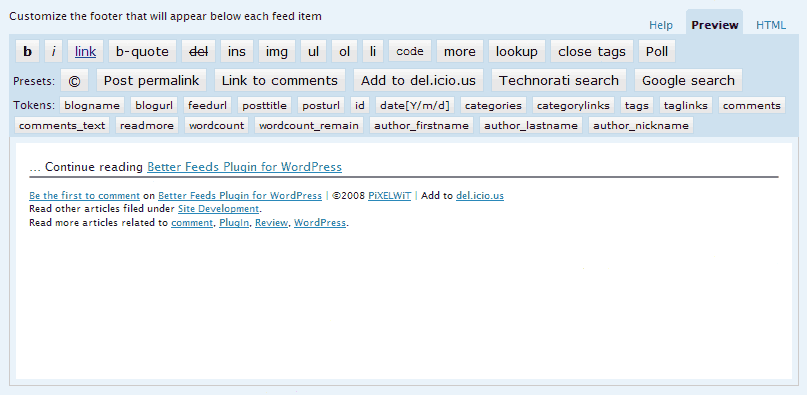
As you can see, Better Feeds does more than just split your feed at the more tag, it can also access:
- The post URL.
- Post title.
- Blog title.
- Author’s name.
- Current date.
- Number of comments received.
- Related Categories
- Related Tags.
- Number of words after the “more” tag.
If you like the way my feed footer is configured you can download and install the Better Feeds plugin and go to the admin panel to enter the following information:
Read More Link…
<a href="%%posturl%%#more-%%id%%" title="Read more">...</a><p><a href="%%posturl%%#more-%%id%%" title="''%%posttitle%%'' continues">Continue reading "%%posttitle%%"</a>.</p>
//
Feed Item Footer…
<hr noshade style="margin:0;height:1px" /><small><p><a title="Comments for ''%%posttitle%%''" href="%%posturl%%#commentblock">%%comments_text%%</a> on <a title="Permalink for ''%%posttitle%%''" href="%%posturl%%">%%posttitle%%</a>, ©%%date[Y]%% <a title="Visit %%blogname%%" href="%%blogurl%%">%%blogname%%</a> | Add to <a title="Bookmark ''%%posttitle%%'' in del.icio.us" href="http://del.icio.us/post?url=%%posturl%%&title=%%posttitle%%">del.icio.us</a><br/>Read other articles filed under %%categorylinks%%.<br/>Read more articles related to %%taglinks%%.</p></small>
//
X Comments Labels…
Be the first to comment
One person has commented
% people have commented
//
If you don’t like the way my feed is currently configured, leave a comment and let me know what’s up.
Ozh’ Better Feed is a powerful plugin that just got a lot easier to use, give it a try if you’d like to customize the appearance of your WordPress RSS feed.
 Comments(14)
 RSS Feeds
[…] Als Ergebnis aus dieser Google Suche mit oben genannten Begriffene ergab sich dann schlussendlich das WordPress Plugin namens ozh Better Feed was laut Beschreibung genau das macht, was ich will im Bezug auf den more-Tag in dem Zusammenhang. […]
I have installed this, and can see the copyright info in IE but nothing in FF. Any ideas why? Maybe my theme doing something odd? Feed: http://www.gbpshop.co.uk/feed
Figured it out finally! It was a PlugIn named Category Visibility-iPeat Rev that caused all the trouble. I threw that nasty thing out! Thanks for the help Pixelwit! I say: Feed away! 😉
@sascha/hdrs, Have you tried deactivating all plugins? If you have a local version of the WordPress files, you can search the whole WordPress folder for files containing “feed” and then look through them to see if any of the code makes a reference to something you might have modified. If you haven’t made many modifications you could try either a fresh install of the latest version of WP or possibly try reverting to an older version.
If none of the above ideas work, at least you’ll know a little more about the guts of WordPress. 😉
Thanks for the hint but nope, I’ve tried through all the permalinks and not even the default works (the http://blog.hexagonstar.com/?p=123 kind of stuff). I’m clueless about what could be wrong.
@sascha/hdrs, I looked into the Category Feeds thing and the only thing I noticed is that Category feeds require you to use “Pretty PermaLinks”. Looking at your site it seems you may be using custom permalinks, have you tried using one of the standard permalink structures to see if that makes a difference? Just a thought.
These plugins look very useful! I will give Better Feed a try.
I’m also trying to offer feeds seperated by categories but somehow it doesn’t work. I get the feed page but it stays empty. E.g. see here: http://blog.hexagonstar.com/category/dev/feed
Maybe somebody of you know what could be the problem? The WordPress forum is as helpful as a humpback.
Edit: Seems that More Feed isn’t yet quite compatible with WP2.6. The admin screen shows all kinds of function blocks instead of an edit area.
@Amit, I’m not sure if you can easily do what you’re asking, but I know that the Better Feeds Plugin lets you run PHP/WordPress functions. You or someone else might be able to write a custom function to do what you’re asking.
@Alea, Yes, I think this is better than FeedBurner feed because you maintain full control of your content.
Can we say that is it better than FeedBurner Feeds?
Hi
I have a problem that maybe you can help me with. I want to allow the downloading of special content only through the feed. for instance an article about coding will have the link to download the example code only in the feed.
Do you have any idea how to do this?
Thanks
Amit
[…] sure you read PiXELWiT’s suggestions on how to form the “Read More” link and the feed entry’s […]
@ George and Ozh, do you have PayPal accounts? If so, please post them here or send them to me so I can send you something for your efforts. Thanks and you’re welcome.
@Ozh, is there a way to append text right after the last word of the excerpt?
Thank you for referring to the more-feed-excerpt plugin.
On the other hand, better feed is a complete solution regarding feed customization and your suggestions about the “Read More” link and the feed entry footer are really useful.
Thanks for the kind words. I’ll be releasing later today a small update that’s more compatible with the visual editor and that will allow to embed any custom function in feed footers for maximum flexibility