Articles Tagged "Tutorial"

Resize Stage and Move PageFlip Tutorial

If you changed the page size of the PageFlip, you probably need to increase or decrease the size of the stage and re-center or reposition the book. Follow this brief tutorial explaining how to do just that.

Resizing the stage:

  1. Open the PageFlip FLA file.
  2. Using the text menu at the top of the screen, navigate to:
  1. Menu».
  2. Modify»
  3. Document
  • Set the “Width” and “Height” to your desired dimensions.
  • Press the “OK” button.
  • Modifying the Background:

    Read More

    FullScreen OnMouseMove Bug

    stinkbugHere’s an interesting fact: Going to FullScreen mode causes Flash to temporarily stop executing all onMouseMove events.

    I’m sure if someone from Adobe was pressed hard enough they might be able to provide some convoluted ~logical~ reasons why going into full-screen mode stops all onMouseMove events but I’m not buying it. I wasted a few frustrating hours figuring this out and when I searched the web to confirm my suspicions I found no mention of this “feature” so I’m calling it what it is, a BUG.

    Here, take a look at this ugly SWF (move your mouse around to draw a line whenever the OnMouseMove event is fired and then press the blue square to toggle fullScreen mode)
    Read More

    PageFlip: Right to Left Modification

    This tutorial explains how to modify the Free PageFlip or Improved PageFlip so that it reads from right to left. Follow along in this simple two part process.

    Part #1) Flip the book movieclip.

    1. Open the Pageflip file to display the main timeline.
    2. Drag the Timeline’s red PlayHead to the last frame of the Actions layer.
    3. Select the small cross in the middle of the stage. This is the Pages movieclip.
    4. Flip the Pages moviecliip horizontally: Menu » Modify » Transform » Flip Horizontal.

    Part#2) Modify the code.
    Read More

    Drawing a Closed Arc Shape

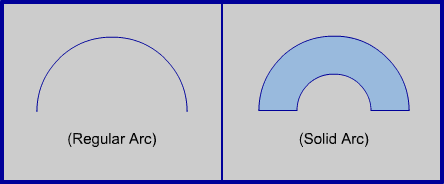
    This tutorial provides the ActionScript needed to draw a “Closed Arc” which is my way of describing the solid shape created by connecting a pair of concentric arcs with 2 straight lines. Here’s an illustration to explain:

    (If you’re new to drawing arcs I suggest reading my previous circle and arc tutorials for an introduction to trigonometry in Flash.)

    In my standard arc drawing tutorial I explained the following ActionScript code
    Read More

    PageFlip Version Detection Fix

    Unfortunately the release of Adobe Flash Player 10 has revealed a weakness in my version detection code. As a result, the pageflip SWF will fail to load and viewers will be prompted to download the Flash 6 Player. Fortunately there are 2 quick fixes
    Read More

    Flash Scripted Conic Angle Gradient

    One of the quirkier aspects of Flash is its lack of a ‘conic’ gradient fill. The conic gradient has been a mainstay of drawing apps like CorelDraw and Photoshop (where it’s called an “Angle Gradient”) for ages but Flash still hasn’t implemented this basic feature. Go ahead and check… it’s not there.

    NOTE: This tutorial uses some of the code and concepts from my previous Color Gradient and Circle Drawing tutorials so I highly recommend checking them out for a more in-depth explanation of the following code
    Read More

    Animated Arc Drawing

    A recent comment on my Oval Drawing Tutorial asks how to “give the appearance that an oval is being drawn slowly”. Hmmm… this sounds like a job for my handy Arc Drawing Function.

    Slowly drawing (or revealing) a circle can be achieved by drawing arcs of an ever-increasing size until the arc is so big that it comes back to the beginning and makes a full circle. The same is true with ovals. First let’s take a look at the basic code for drawing an arc of a circle
    Read More

    © Sean O'Shell 2007-2010